
Chat in English letters.
Write in Telugu.
Use the Tenglish you already know. LipiON turns your words into Telugu, so you can start without learning a new keyboard layout.
THINNAVAతిన్నావా
For everyday Telugu, writing & designType Tenglish. Get Telugu
directly in the font you love.
Tenglish means Telugu words written with English letters. Use the way you already chat, or your familiar Telugu keyboard layout, in supported desktop apps.
One verified sample. This preview does not control the desktop app.
Type in English letters.
Get Telugu text.
Modern or classic fonts.
One typing companion.
Stay in your document.
Type where you work.
FOR DESIGNERS, VIDEO EDITORS & DTP TEAMS
Write Telugu in the tools you already use for design, video editing and publishing.
 Photoshop
 Illustrator
 InDesign
 CorelDRAW
 Premiere Pro
 After Effects
 DaVinci Resolve
 Final Cut Pro
 Wondershare Filmora
 Avid Media Composer
 QuarkXPress
 PageMaker
 Microsoft Word
Choose a compatible Telugu font and the matching Unicode or non-Unicode output for your application. Font & setup guide
Application names and logos identify their respective products. LipiON is independent and is not endorsed by these companies.
The font you want. The typing you know.
You don’t need to learn a traditional keyboard layout to use a supported non-Unicode Telugu font. Type naturally in Tenglish and let LipiON handle the font’s character mapping.
Already know the layout? Keep using it. Both ways are available.
Try the two font previewsA familiar way for everyone
New to Telugu typing, or doing it for years?
LipiON has a place for both.
Use the Tenglish you already know. LipiON turns your words into Telugu, so you can start without learning a new keyboard layout.
Keep using the supported Telugu keyboard layout you’re comfortable with. Work in Unicode or compatible non-Unicode fonts.
For experienced typists & publishing teamsA typing companion, with a converter too
Write Telugu words with English letters. Start with the typing style you already use in chats.
Type directly in compatible non-Unicode fonts, with the required mapping handled by LipiON.
Create standard Telugu text for supported documents and everyday text fields.
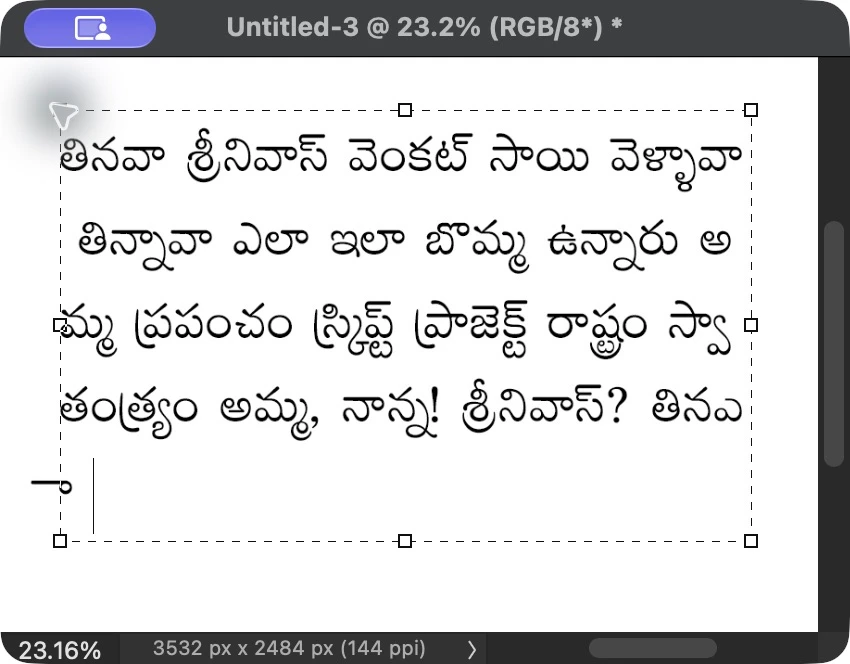
Stay inside your supported design or document app while you write. Photoshop is one of the supported workflows.
Use the desktop mode controls or F12 to switch between your selected Telugu mode and normal English typing.
Move between Unicode and compatible non-Unicode formats, with a larger window for reviewing articles.
Old favourites. New possibilities.
Unicode stores actual Telugu characters, making it the usual choice for modern documents and messages.
Non-Unicode fonts use their own character mappings. They need a compatible app and the correct font selected. LipiON handles that mapping for supported fonts.
See supported fonts and applicationsPriyaanka is one of the supported non-Unicode font workflows.
Less setup. More writing.
A few small steps,
and you’re ready to write.
Open the app and choose Tenglish or the supported Telugu keyboard layout.
Open your document and select a supported font. Match the output mode to your work.
Write directly in your supported application. Switch to English whenever you need it.
Fewer interruptions
Direct typing can remove the repeated
conversion step in supported workflows.
The steps vary by person, font and application.
Keep the converter for text you already have.
Behind the words
Use the typing method you prefer.
Turn words into Telugu and map supported fonts.
See the result in your supported application.
Already have the text?
Move existing text between Unicode and compatible non-Unicode formats. Review both versions side by side, then copy or save your result.
Working with a long article? The larger converter window gives you room. Always keep your original and check mixed English–Telugu text.
Know what works
Designed and verified for Photoshop and Word on Mac, plus popular design and publishing applications on Windows.
See the supported versions and fontsSupported font workflows let you type directly in the application. Compatibility is specific to the app version, font and operating system.
Use Unicode for modern documents and ordinary text fields. Use non-Unicode only where a compatible font can be selected.
Version 4.0 is ready for distribution across supported applications and configurations.
For people who work with Telugu
Graphic designers, social-media designers, invitation makers, print shops, studios and agencies preparing Telugu text for their layouts.
DTP operators, newspapers, publishers, content creators and video editors preparing Telugu text for supported workflows.
Keep using the supported layout you know, or start with Tenglish for everyday writing. Neither method is compulsory.
A few things to know
New to the terms? Start here.
For exact versions and fonts, use the compatibility guide.
LipiON is a desktop Telugu typing utility with a built-in text converter. Type in Tenglish or the supported Telugu keyboard layout, and use Unicode or compatible non-Unicode output in supported applications.
Tenglish is Telugu written using English letters, just as many people type in chats. LipiON turns those spellings into Telugu.
No. Choose Tenglish and use English letters. The traditional layout is optional for people who already know it.
Yes, Photoshop supports Anek Telugu Unicode and Priyaanka non-Unicode output. Older versions on Windows also support Priyaanka legacy output. Check the compatibility guide for setup details.
Yes, for selected supported fonts in compatible applications. Priyaanka is one of the supported workflows. The correct font must be selected in your document.
Yes, in supported text fields and applications. Anek Telugu, Gautami and Ramabhadra can be used with matching font selections.
Unicode stores actual Telugu characters. Non-Unicode fonts use a different character mapping and display correctly only when the required font is applied in a compatible app.
Yes. Choose the supported Telugu keyboard mode and continue using the keys you know. You can switch to normal English typing when needed.
No. Compatibility depends on the font, mapping, application version and operating system. Older design applications may support legacy fonts without supporting modern Telugu Unicode shaping.
No. Use Unicode in ordinary browser fields, email and messaging. The special font preview on this website loads its own font and is not a promise of non-Unicode typing throughout your browser.
Direct typing avoids a separate conversion step for new text in supported workflows. For text you already have, use the built-in converter and review the result before copying or saving.
Some spellings can represent more than one Telugu word. Dictionary support helps with common words and names, but occasional corrections may be needed.
No. The switch, font picker and typing box demonstrate one verified sample inside this website. They do not start the desktop app, change your system fonts or control another application.
LipiON is an independent product. Third-party names identify relevant fonts or applications and do not imply endorsement, partnership or official compatibility certification.
LipiON 4.0 is available for Apple Silicon Mac (macOS 13.4+) and Windows. Download links will be active shortly.
Make room for your words
Meet your new Telugu typing companion.
LipiON 4.0 · Apple Silicon Mac (macOS 13.4+) & Windows