Telugu typing depends on the font, application version and operating system. Here’s what the two font types mean and how to get set up.
Version 4.0 is ready for distribution. LipiON is designed for Apple Silicon Mac (macOS 13.4+) and Windows environments across the listed creative and document applications.
INSTALL YOUR FONTS SEPARATELY
Get the fonts you want to use.
LipiON is a typing tool, not a font pack. Download and install your chosen fonts separately, then select them inside your design or document app.
Non-Unicode fonts
Classic fonts for design & DTP
For Anu fonts such as Priyaanka or Pallavi, visit Anu’s official website to obtain the appropriate licensed font package. For other font families, use the respective font creator’s official website.
Links open the official font pages in a new tab. Download your preferred family and follow its included license.
After downloading
Extract the download if it is a ZIP file.
Install the font files using Windows font installation or Font Book on Mac.
Reopen your design or document app and select the font in your text.
In LipiON, choose the matching Unicode or non-Unicode output and try a short sample.
Already have the required fonts installed? You can keep using them; there is no need to download them again.
Choose the right text format
Two font types. Different text underneath.
Unicode
Standard Telugu characters
Use Unicode for modern documents, websites, email and messages. Your text stays Telugu when used with a suitable Unicode font.
Anek Telugu, Gautami and Ramabhadra are standard Unicode Telugu fonts for modern typography and everyday typing.
Non-Unicode
Characters mapped to font glyphs
A non-Unicode font displays Telugu using its own character mapping. Without the correct font, the underlying text may look like English letters, symbols or empty boxes.
Priyaanka is supported across Mac and Windows workflows. Other legacy families can be used with compatible font files and matching application settings.
The website’s font picker loads actual Anek Telugu and Priyaanka files. It demonstrates guided sample words and does not enable non-Unicode typing in other browser fields.
Supported applications
Applications & workflows.
Verified applications and workflows supported by LipiON 4.0.
Supported typing workflows across desktop applications
Platform
Application
Supported font workflow
Mac
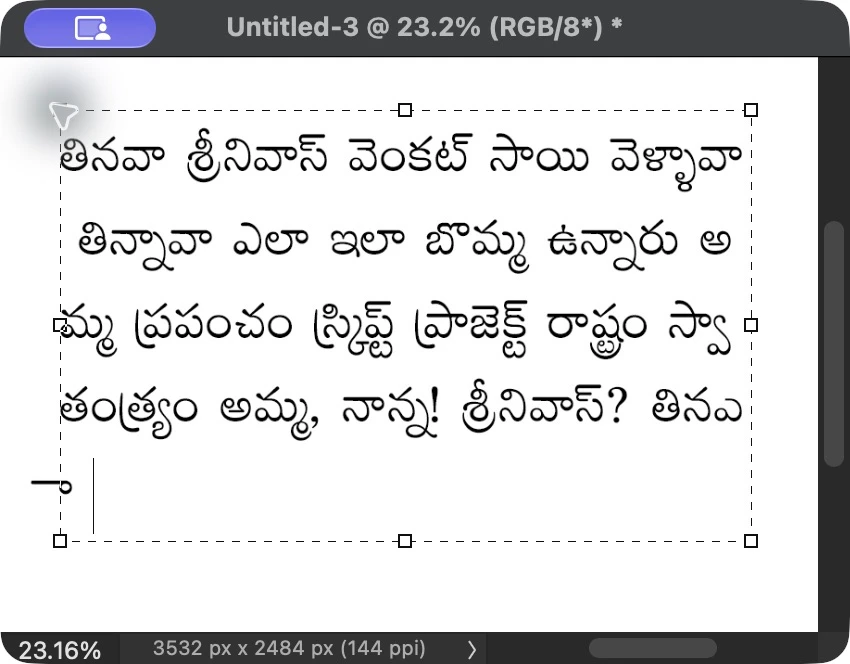
Photoshop 2026
Anek Telugu Unicode and Priyaanka non-Unicode
Mac
Microsoft Word
Anek Telugu Unicode and Priyaanka non-Unicode
Windows
Photoshop 7
Priyaanka non-Unicode layout and Tenglish typing
Windows
QuarkXPress 5
Priyaanka non-Unicode layout and Tenglish typing
Windows
PageMaker 7
Priyaanka non-Unicode layout and Tenglish typing
Windows
Word 2007
Nirmala UI Unicode and Priyaanka non-Unicode
Older design software workflows use dedicated non-Unicode character mapping.
View Photoshop typing sample Mac Photoshop typing example using Priyaanka non-Unicode font.
Before you start
A few practical checks.
For non-Unicode typing
Use a supported font file in a compatible document or design app.
Select the font in your actual document, not just a font-picker search field.
Choose the appropriate output mode in LipiON.
Use Unicode in ordinary browser fields, email and messaging.
For the desktop application
On Mac, allow the keyboard permissions requested by the app.
Older Windows applications running as administrator may need LipiON to run with matching privileges.
Check a short sample before starting a long document.
Keep an original copy when converting older or mixed-language articles.
Independent product
Third-party names & compatibility.
LipiON is independent and is not affiliated with, endorsed by or sponsored by Anu, Adobe, Microsoft, Quark or the owners of the fonts mentioned here. Product and font names identify the relevant applications and workflows. They do not imply partnership or official certification.